
Agents decide. Containers execute.
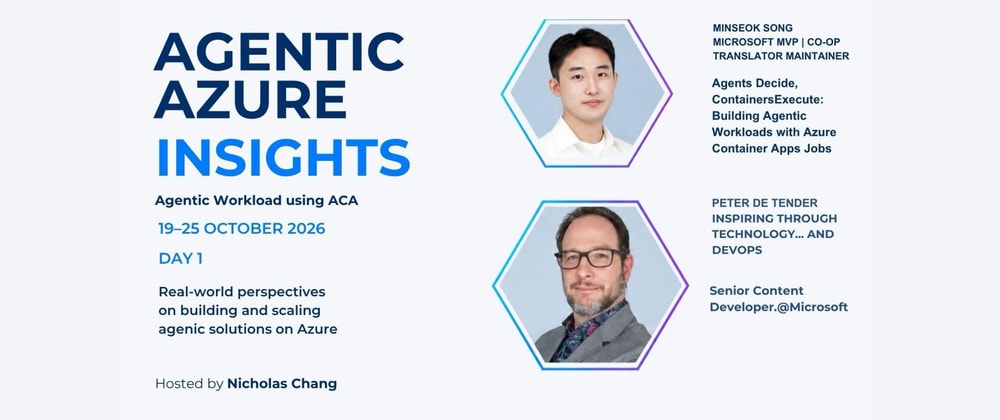
At 4:00 AM KST on October 20, I will speak at the first live event for Agentic Azure Insights. In the UK, where the event is hosted, it will still be 8:00 PM on October 19.
I will be joining Peter De Tender for the event, and my session is called "Agents Decide, Containers Execute: Building Agentic Workloads with Azure Container Apps Jobs."
There is one question behind the session.
How can I keep an agent from using the wrong data or acting beyond the scope I intended?
It is easy to let an agent both decide what to do and execute the work directly. But once the agent can run code or change something outside itself, I need a clearer boundary between its judgment and the environment that carries out the work.
The structure I am preparing is fairly simple. The agent decides which checks are needed. A container performs those checks in a separate execution environment.
Foundry Routines starts the agent at a specific time, on a recurring schedule, or when an event occurs. The agent running in Microsoft Foundry Agent Service chooses the work it needs. A Python tool validates the input and places approved work in Azure Queue Storage. An Azure Container Apps job reads that work, runs the checks, and saves the report to Azure Blob Storage.
The demo will also show how the same work can start on demand, on a schedule, or from a queue event.
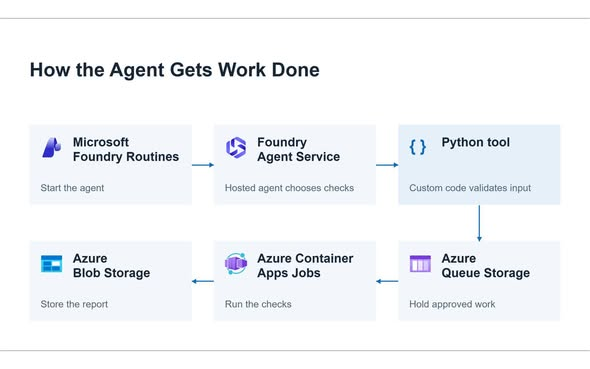
A slide makes this flow look tidy. Getting the whole path to work during a live demo is a different problem.
The organizers originally gave me the option of recording the session, but this one will be fully live. I am glad to be part of the first live event, although the 4:00 AM start in Korea already feels a little daunting.
I also have another LG Uplus Power Automate course next week. Preparing the course, the slides, and the demo at the same time has made the past few days busy.
The architecture and demo are still being refined. I do not think I have a complete answer to the boundary between agent judgment and safe execution yet. For this session, I want to show one practical way to make that boundary visible and testable.
For now, I am working on getting the demo to reach the last box in the diagram without any surprises.